


- October 30 2026
- Nikias Kray
B2B CRM Solutions: The Complete Guide to Choosing, Implementing and Scaling a Business CRM
B2B CRM solutions are the operational backbone of modern business-to-business sales. Unlike consumer sales, B2B deals usually involve longer cycles, multiple decision-makers, complex pricing, contracts and ongoing account management. A spreadsheet or a simple contact list cannot keep up with that complexity. A well-chosen B2B CRM centralizes customer data, aligns marketing, sales and service teams, and gives leadership a reliable view of pipeline and revenue.
This guide explains what B2B CRM solutions are, which features matter most, how leading platforms compare, how to implement a CRM successfully and how to avoid the mistakes that cause many CRM projects to underdeliver.
Key Takeaways
- A B2B CRM manages accounts, contacts, deals, activities and relationships across long, multi-stakeholder sales cycles.
- Core capabilities include account-based views, pipeline management, sales automation, quoting, reporting and integrations.
- AI features such as lead scoring, forecasting and conversation insights are becoming standard in B2B CRM solutions.
- Successful implementation depends more on process design, data quality and user adoption than on the software alone.
- Integrations with email, ERP, accounting, marketing automation and support tools determine much of a CRM's real value.
What Is a B2B CRM Solution?
A B2B CRM solution is customer relationship management software designed for companies that sell to other businesses. It stores information about organizations (accounts) and the people inside them (contacts), tracks opportunities through defined pipeline stages, records every interaction, and automates repetitive tasks. Its purpose is to help teams build long-term relationships, close larger deals and retain and expand existing customers.
In B2B, relationships are layered. A single deal might involve a champion, a technical evaluator, a procurement manager, a legal reviewer and an executive sponsor. B2B CRM solutions map these roles, show who has been engaged and highlight gaps in coverage, which is critical for account-based selling.
Why B2B Companies Need a Dedicated CRM
- Long sales cycles. Deals can last months. A CRM keeps context, next steps and history in one place so nothing falls through the cracks.
- Multiple stakeholders. Buying committees require visibility into every contact and their influence on the decision.
- Complex products and pricing. Configurations, discounts, quotes and approvals need structured workflows.
- Account expansion. In many B2B models, a large share of revenue comes from renewals, upsells and cross-sells, which require account-level insight.
- Forecasting accuracy. Leadership needs reliable pipeline data to plan hiring, production and cash flow.
- Team alignment. Marketing, sales, customer success and finance work from the same customer record.
Essential Features of B2B CRM Solutions
Account and Contact Management
A strong B2B CRM links contacts to companies, supports parent-child account hierarchies and shows all related deals, tickets, documents and activities on a single account record.
Pipeline and Opportunity Management
Customizable pipelines, deal stages, probabilities, required fields and stage-based automation help teams follow a consistent sales process and allow managers to spot bottlenecks.
Sales Automation and Sequences
Automated task creation, email sequences, meeting scheduling and follow-up reminders save time and ensure consistent outreach.
Quoting, Products and CPQ
Product catalogs, price books, quote generation, e-signature integrations and approval workflows shorten the path from proposal to contract.
Reporting and Forecasting
Dashboards for pipeline coverage, win rates, sales cycle length, activity metrics and forecast categories give leadership real-time insight.
Marketing and Sales Alignment
Lead capture, lead scoring, attribution and handoff rules connect marketing campaigns with sales outcomes.
Integrations and APIs
Native integrations and open APIs connect the CRM with email, calendars, ERP, accounting, customer support software, document tools and communication platforms.
AI Capabilities
Predictive lead scoring, deal risk alerts, forecast assistance, call transcription and summarization, and AI writing assistants are increasingly built into B2B CRM solutions.
Comparison of Popular B2B CRM Solutions
The overview below provides a high-level, qualitative comparison of widely used platforms. Features and pricing change frequently, so always verify current details with each vendor.
Salesforce Sales Cloud
- Best Fit: Mid-market and enterprise with complex processes
- Strengths: Deep customization, large ecosystem, advanced AI features
- Considerations: Implementation complexity and total cost can be high
HubSpot Sales Hub
- Best Fit: SMB to mid-market, marketing-led growth
- Strengths: Ease of use, unified marketing-sales-service platform, strong adoption
- Considerations: Advanced features require higher tiers
Microsoft Dynamics 365 Sales
- Best Fit: Organizations using Microsoft 365 and Azure
- Strengths: Tight Microsoft integration, ERP connectivity
- Considerations: Configuration often requires experienced partners
Zoho CRM
- Best Fit: Cost-conscious SMB and mid-market
- Strengths: Broad feature set, wide app suite
- Considerations: Interface and setup can feel complex at scale
Pipedrive
- Best Fit: Small sales teams focused on pipeline
- Strengths: Simple visual pipeline, fast onboarding
- Considerations: Fewer enterprise-grade features
Bitrix24
- Best Fit: SMB needing CRM plus collaboration
- Strengths: CRM combined with tasks, communications and intranet
- Considerations: Breadth can make configuration time-consuming
How to Choose the Right B2B CRM Solution
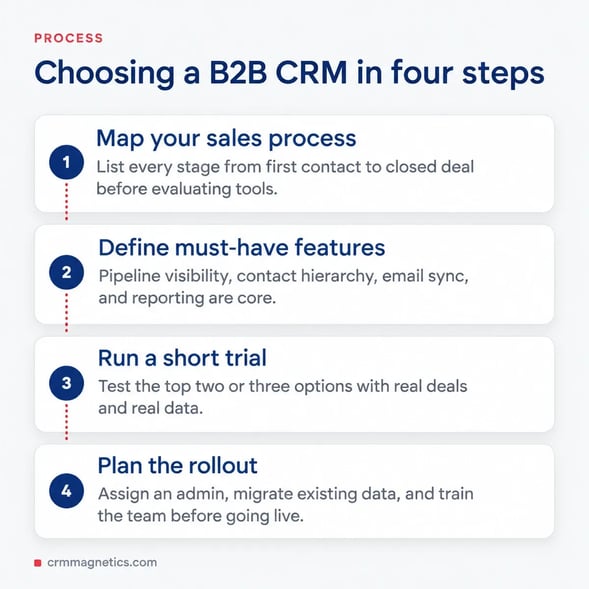
Selecting a CRM should begin with your business processes, not with a feature list. Start by mapping how leads are generated, qualified, handed off, closed and onboarded. Identify the data each team needs and the reports leadership relies on. Then evaluate platforms against these requirements.
- Define objectives. Examples include shortening the sales cycle, improving forecast accuracy, increasing renewal rates or reducing manual data entry.
- List must-have integrations. Email, calendar, ERP, accounting, e-signature, telephony and support systems.
- Assess usability. If salespeople find the CRM cumbersome, adoption and data quality will suffer.
- Check scalability. Consider future team size, additional business units, new regions and more complex processes.
- Evaluate total cost of ownership. Include licenses, implementation, integrations, training, admin resources and add-ons.
- Review security and compliance. Data residency, access controls, audit logs and compliance with relevant regulations.
- Run a pilot. Test real scenarios with a small group before committing to a full rollout.
Implementation Best Practices
CRM implementation is a business transformation project. The most successful projects share several characteristics. They have an executive sponsor and a clear project owner. They define a simple, standardized sales process before configuring the system. They clean and deduplicate data before migration. They launch with a minimum viable configuration and iterate based on user feedback. And they invest in training, documentation and ongoing administration.
A phased approach works best: start with core contact, account and deal management, then add automation, quoting, integrations and advanced analytics. Each phase should have measurable goals, such as the percentage of deals with complete required fields or the share of activities logged automatically.
Common B2B CRM Mistakes to Avoid
- Over-customizing the system before users have adopted the basics.
- Migrating dirty, duplicated or outdated data.
- Ignoring integration needs until after launch.
- Treating the CRM as a reporting tool for managers rather than a productivity tool for sellers.
- Lacking a dedicated CRM owner or administrator.
- Failing to define data governance rules, field definitions and ownership.
Key Metrics to Track in a B2B CRM
A B2B CRM delivers value only when teams use its data to make decisions. Once the system is live, define a small set of metrics that reflect the health of your pipeline and customer base, and review them in weekly sales meetings and monthly leadership reviews.
- Pipeline coverage. The ratio of open pipeline value to the sales target for a period, showing whether there are enough opportunities to hit the number.
- Win rate. The share of qualified opportunities that close as won, ideally segmented by source, product, region and deal size.
- Average sales cycle length. The time from opportunity creation to close, which helps with forecasting and identifying friction in specific stages.
- Stage conversion rates. The percentage of deals that move from one stage to the next, revealing exactly where deals stall.
- Average deal size. Useful for capacity planning and for evaluating the impact of pricing and packaging changes.
- Net revenue retention. For subscription and recurring-revenue businesses, this shows how renewals, expansions and churn affect revenue from existing customers.
- Data completeness. The share of records with required fields filled in, which is a leading indicator of CRM adoption and reporting reliability.
Tracking these metrics consistently turns the CRM from a record-keeping tool into a management system. It also creates the clean historical data that AI-driven forecasting and lead scoring require.
B2B CRM Solutions and AI
Artificial intelligence is changing how B2B teams use CRM. Predictive models identify which leads and accounts are most likely to convert, forecast tools analyze historical patterns to estimate pipeline outcomes, and generative AI drafts emails, summarizes calls and prepares account briefs. These capabilities only work well with clean, consistent data, which is another reason why data governance should be a priority from day one.
Getting Expert Help With B2B CRM
Choosing and implementing a B2B CRM involves technical, process and change-management decisions. For CRM-related inquiries, including platform selection, HubSpot implementation and onboarding, CRM integrations with tools such as Gmail, Slack, NetSuite, QuickBooks, PandaDoc and LinkedIn, data migration and pipeline design, contact CRM Magnetics at https://crmMagnetics.com/. Their team helps B2B organizations build CRM systems that sales teams actually use and that leadership can trust for decision-making.
Conclusion
B2B CRM solutions are no longer just digital address books. They are platforms for managing complex relationships, coordinating teams, automating processes and forecasting revenue. The right choice depends on your sales model, integration landscape, budget and growth plans. Focus on process clarity, data quality, integrations and user adoption, and your CRM will become one of the most valuable assets in your business.
Frequently Asked Questions (FAQ)
1. What is a B2B CRM solution?
A B2B CRM solution is software that helps companies selling to other businesses manage accounts, contacts, deals, activities and relationships across long and complex sales cycles.
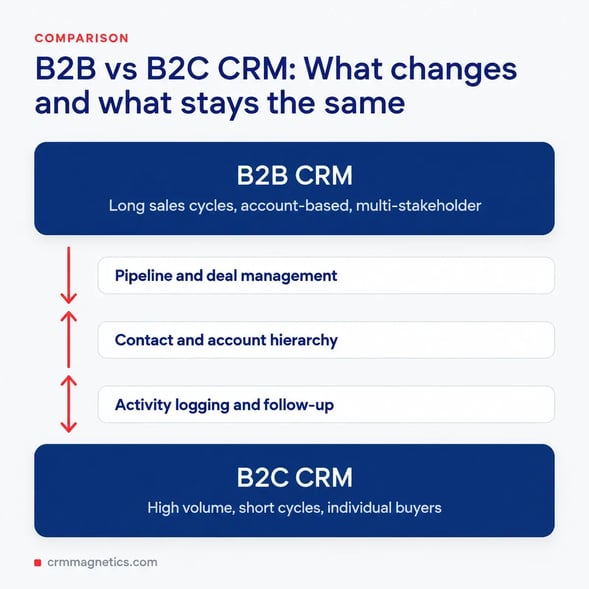
2. How is B2B CRM different from B2C CRM?
B2B CRM focuses on accounts, buying committees, long sales cycles and complex deals, while B2C CRM typically handles large volumes of individual consumers and shorter transactions.
3. Which features are most important in a B2B CRM?
Account and contact management, pipeline management, sales automation, quoting, reporting, forecasting, integrations and increasingly AI-driven insights.
4. Which B2B CRM is best for small businesses?
Small B2B teams often choose platforms that are easy to adopt, such as HubSpot, Pipedrive or Zoho CRM. The best choice depends on process complexity, integrations and budget.
5. How long does B2B CRM implementation take?
A basic implementation can take a few weeks, while complex enterprise projects with integrations and migrations can take several months. Phased rollouts reduce risk.
6. Can a B2B CRM integrate with ERP and accounting systems?
Yes. Most leading B2B CRM solutions offer native integrations or APIs to connect with ERP and accounting systems such as NetSuite and QuickBooks.
7. Why do CRM implementations fail?
Common reasons include poor user adoption, unclear processes, low data quality, over-customization and the lack of a dedicated CRM owner.
8. How does AI improve B2B CRM solutions?
AI improves lead and deal prioritization, forecasting, activity capture, email drafting, call summarization and identification of churn or expansion opportunities.
9. What is account-based selling in CRM?
Account-based selling focuses sales and marketing efforts on specific high-value accounts. A B2B CRM supports it with account hierarchies, stakeholder mapping and account-level reporting.
10. How do I calculate the cost of a B2B CRM?
Include subscription licenses, implementation services, integrations, data migration, training, administration and any add-ons or premium features required.
11. Who can help me implement a B2B CRM?
CRM Magnetics (https://crmMagnetics.com/) provides CRM consulting, implementation, integrations and optimization services for B2B companies.
Leave your thought here
Your email address will not be published. Required fields are marked *