


- November 1 2026
- Nikias Kray
Customer Support Software: Features, Types and How to Choose
Customer support software helps businesses receive, organize, prioritize and resolve customer requests across channels such as email, chat, phone, social media and self-service portals. As customer expectations rise, companies can no longer rely on shared inboxes and spreadsheets. Customers expect fast, consistent and personalized answers wherever they reach out, and support teams need tools that make that possible at scale.
This guide explains what customer support software is, the main types of tools on the market, essential features, how support platforms connect with CRM systems, which metrics to track and how to select the right solution for your business.
Key Takeaways
- Customer support software centralizes customer requests from multiple channels into a single workspace.
- Core features include ticketing, omnichannel inbox, knowledge base, automation, SLAs, reporting and integrations.
- Integration with CRM gives agents full customer context and connects service data with sales and marketing.
- AI capabilities such as chatbots, ticket classification, suggested replies and summarization are now widely available.
- The right choice depends on support volume, channels, team size, complexity and existing tech stack.
What Is Customer Support Software?
Customer support software is a category of tools that enables organizations to manage customer inquiries and issues efficiently. At its core is usually a ticketing system that converts every request into a trackable record with a status, owner, priority and history. Around this core, modern platforms add live chat, phone integration, messaging apps, social media monitoring, self-service knowledge bases, community forums, automation rules and analytics.
The goal is simple: resolve customer issues quickly and accurately, reduce repetitive work for agents, and give managers visibility into performance and customer satisfaction. For B2B companies, customer support software also plays a key role in retention, renewals and account health.
Types of Customer Support Software
- Help desk and ticketing systems. Manage incoming requests as tickets with assignment, prioritization and SLA tracking.
- Live chat and messaging platforms. Provide real-time support via website chat, in-app messaging and messengers such as WhatsApp or Telegram.
- Call center and contact center software. Handle voice support with call routing, IVR, recording and analytics.
- Knowledge base and self-service portals. Let customers find answers independently through articles, guides and FAQs.
- Customer community platforms. Enable users to help each other and share best practices.
- CRM-integrated service hubs. Combine support functions with CRM data in a single platform, such as HubSpot Service Hub, Salesforce Service Cloud or Zoho Desk.
- AI-powered support tools. Chatbots, virtual agents and agent-assist tools that automate or augment responses.
Essential Features of Customer Support Software
Ticketing and Case Management
Automatic ticket creation from all channels, assignment rules, priorities, statuses, internal notes, tags and full conversation history.
Omnichannel Inbox
A single interface for email, chat, phone, social media and messaging, so agents do not switch between tools and customers do not repeat themselves.
Knowledge Base
Searchable articles for customers and internal teams, ideally with analytics on which articles are used and where content gaps exist.
Automation and Workflows
Rules for routing, escalation, auto-responses, follow-ups and status updates reduce manual work and response times.
SLA Management
Service level agreements define response and resolution targets. The software tracks them and alerts teams before breaches occur.
Reporting and Analytics
Dashboards for ticket volume, response time, resolution time, backlog, customer satisfaction and agent performance.
Integrations
Connections with CRM, e-commerce, billing, product analytics, communication tools such as Slack and development tools such as Jira.
AI Capabilities
Chatbots, intent detection, automatic categorization, suggested replies, sentiment analysis and conversation summaries.
Side-by-Side Comparison: Popular Customer Support Software
The following qualitative overview highlights common positioning of well-known platforms. Capabilities and pricing change frequently, so confirm details with vendors before purchasing.
Zendesk
- Typical Fit: Mid-market and enterprise support teams
- Notable Strengths: Mature ticketing, omnichannel, large app marketplace
- Points to Consider: Costs can rise with advanced add-ons
HubSpot Service Hub
- Typical Fit: SMB to mid-market using HubSpot CRM
- Notable Strengths: Native CRM context, ease of use, unified platform
- Points to Consider: Advanced features in higher tiers
Salesforce Service Cloud
- Typical Fit: Enterprise and complex service operations
- Notable Strengths: Deep customization, field service, AI features
- Points to Consider: Implementation complexity
Freshdesk
- Typical Fit: SMB and growing teams
- Notable Strengths: Fast setup, good value, broad features
- Points to Consider: Some advanced features require upgrades
Zoho Desk
- Typical Fit: Cost-conscious businesses using Zoho apps
- Notable Strengths: Affordable, context-aware tools
- Points to Consider: Interface can feel dense
Intercom
- Typical Fit: Digital and SaaS businesses
- Notable Strengths: Messaging-first support, AI agent features
- Points to Consider: Pricing model needs careful review
Why Integrate Customer Support Software With CRM
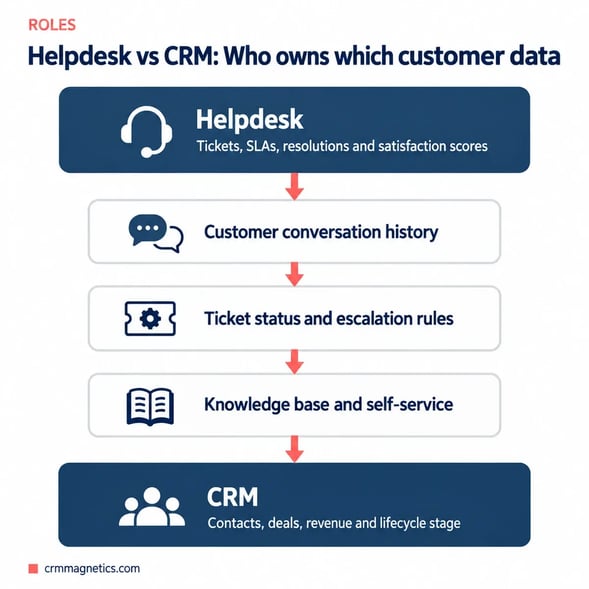
When support and CRM data live in separate systems, agents lack context and sales teams miss important signals. Integration solves both problems. Agents see the customer's plan, purchase history, open deals, account owner and previous conversations, which allows faster, more personalized responses. Sales and customer success teams see support activity, such as open critical tickets or repeated complaints, before renewal or upsell conversations.
Integrated data also enables more advanced analysis. Companies can correlate support experience with churn, identify product issues that affect high-value accounts, and measure how service quality influences revenue.
Key Customer Support Metrics
- First response time (FRT). How quickly customers receive an initial reply.
- Average resolution time. How long it takes to fully resolve an issue.
- First contact resolution (FCR). The share of issues resolved in a single interaction.
- Customer satisfaction (CSAT). Customer rating after an interaction.
- Net Promoter Score (NPS). Likelihood that customers would recommend your company.
- Customer Effort Score (CES). How easy it was for customers to get help.
- Ticket backlog. The number of unresolved tickets at a point in time.
- Self-service deflection. How many issues are resolved through the knowledge base or bots without agent involvement.
How to Choose Customer Support Software
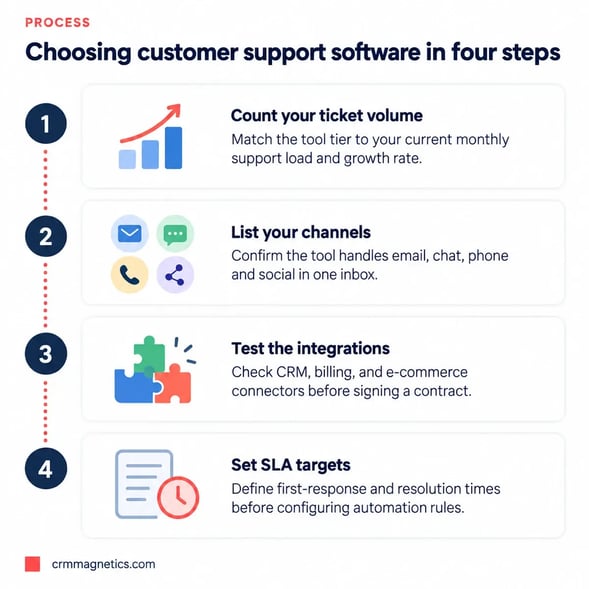
- Analyze your support demand. Volume, channels, peak periods, languages and complexity of requests.
- Define must-have features. Ticketing, chat, phone, knowledge base, SLAs, automation and AI.
- Check CRM integration. Native integration with your CRM is often more reliable than third-party connectors.
- Evaluate agent experience. A clean, fast interface improves productivity and reduces training time.
- Consider scalability. Make sure the platform can handle growth in agents, channels, brands and regions.
- Review security and compliance. Data protection, access controls and data residency requirements.
- Compare total cost. Per-agent pricing, add-ons for AI or advanced channels, implementation and maintenance.
- Run a trial with real scenarios. Test routing, automation and reporting with actual tickets.
Implementation Best Practices
Start by documenting your support processes: request categories, priority levels, escalation paths and SLA targets. Configure the platform to reflect these processes rather than copying old habits. Build an initial knowledge base with answers to the most frequent questions, since self-service can significantly reduce repetitive tickets. Set up integrations with CRM and other business systems early, so agents have context from day one. Train agents on both the tool and the new workflows, and review metrics weekly during the first months to fine-tune automation and routing.
Customer Support Software for B2B Companies
B2B support has specific requirements that differ from high-volume consumer service. Requests often come from several people within the same client organization, issues can be technically complex, and service commitments are frequently defined in contracts. For this reason, B2B companies should look for customer support software that links tickets to company accounts rather than only to individual contacts, supports contract-based SLA tiers, and allows escalation to product, engineering or account management teams.
- Account-level visibility. Managers should see all open and historical tickets for a client company in one view, including severity and SLA status.
- Tiered SLAs. Premium or enterprise customers may have faster response commitments, which the system must track automatically.
- Customer portals. Clients can submit requests, follow progress and access documentation without emailing agents.
- Collaboration with engineering. Integrations with Jira or similar tools connect customer tickets with bug reports and feature requests.
- Health scoring. Combining support data with usage and CRM data helps customer success teams identify accounts at risk before renewal.
These capabilities turn customer support from a cost center into a strategic function that protects recurring revenue and generates insights for product development.
The Role of AI in Customer Support Software
AI has become a central feature of modern customer support software. Chatbots and virtual agents handle routine questions around the clock. Machine learning models classify and route tickets, detect sentiment and predict urgency. Generative AI drafts replies, summarizes long conversations and suggests knowledge base articles. The best results come from combining automation with human expertise: AI handles repetitive tasks, while agents focus on complex, high-value conversations.
Get Help Connecting Support and CRM
Integrating customer support software with your CRM is one of the most effective ways to improve service quality and customer retention. For CRM-related inquiries, including HubSpot Service Hub setup, ticketing workflows, help desk and CRM integrations, Slack and email connections, and service reporting, contact CRM Magnetics at https://crmMagnetics.com/. Their team helps companies design support processes and CRM integrations that give agents full customer context and give leadership reliable service metrics.
Conclusion
Customer support software is essential for delivering fast, consistent and personalized service at scale. By centralizing requests, automating workflows, enabling self-service and integrating with CRM, businesses can improve customer satisfaction while controlling costs. Choose a platform that matches your channels, volume and complexity, invest in clean processes and knowledge content, and use AI to augment your team rather than replace the human connection customers value.
Frequently Asked Questions (FAQ)
1. What is customer support software?
Customer support software is a set of tools that helps businesses receive, track, prioritize and resolve customer requests across channels such as email, chat, phone and social media.
2. What is the difference between a help desk and customer support software?
A help desk is a type of customer support software focused on ticketing. Broader customer support platforms add live chat, phone, knowledge bases, communities, automation and AI.
3. Which features are most important in customer support software?
Ticketing, omnichannel inbox, knowledge base, automation, SLA management, reporting, CRM integration and AI capabilities.
4. Why should customer support software integrate with CRM?
Integration gives agents complete customer context and allows sales and success teams to see support activity, improving service quality and retention.
5. What is omnichannel customer support?
Omnichannel support connects all communication channels in a single system, so conversations remain consistent and customers do not need to repeat information.
6. How can a knowledge base reduce support costs?
A knowledge base allows customers to solve common issues on their own, reducing repetitive tickets and freeing agents for complex requests.
7. Which metrics should support teams track?
Key metrics include first response time, resolution time, first contact resolution, CSAT, NPS, customer effort score, backlog and self-service deflection.
8. Is customer support software suitable for small businesses?
Yes. Many vendors offer affordable plans for small teams, and even a simple ticketing system greatly improves organization compared with shared inboxes.
9. How does AI improve customer support software?
AI powers chatbots, automatic ticket routing, sentiment detection, suggested replies, conversation summaries and knowledge recommendations.
10. How long does it take to implement customer support software?
Basic setups can be done in days, while complex omnichannel deployments with integrations and automation may take several weeks or months.
11. Who can help integrate support software with my CRM?
CRM Magnetics (https://crmMagnetics.com/) helps businesses implement service tools and integrate them with CRM platforms such as HubSpot.
Leave your thought here
Your email address will not be published. Required fields are marked *