


- November 2 2026
- Nikias Kray
AI-Powered Customer Support Tools
AI-powered customer support tools are changing the way companies serve their customers. Chatbots that once answered only a handful of scripted questions have evolved into virtual agents that understand natural language, search knowledge bases, take actions in business systems and hand over to humans with full context. Behind the scenes, AI classifies tickets, detects sentiment, suggests replies, summarizes conversations and helps managers spot trends. For many organizations, the question is no longer whether to use AI in customer support, but how to use it responsibly and effectively.
This article explains the main categories of AI-powered customer support tools, their benefits and limitations, how to implement them, which metrics to track and how to connect AI support with CRM data for better customer experiences.
Key Takeaways
- AI-powered customer support tools automate routine requests and augment human agents with real-time assistance.
- Main categories include AI chatbots and virtual agents, agent-assist tools, intelligent routing, sentiment analysis, knowledge management and quality assurance.
- Generative AI enables natural conversations, automatic summaries and draft responses grounded in company knowledge.
- Success depends on high-quality knowledge content, clean CRM data, clear escalation paths and continuous monitoring.
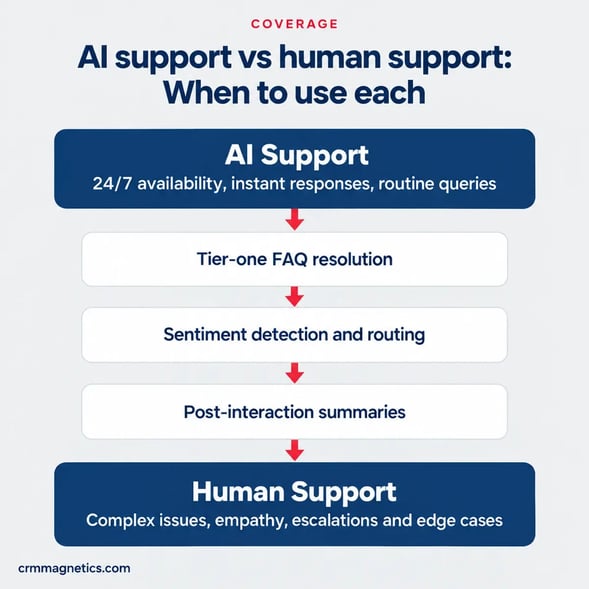
- The best model is human plus AI: automation handles volume, people handle complexity and empathy.
What Are AI-Powered Customer Support Tools?
AI-powered customer support tools are software applications that use artificial intelligence technologies, including natural language processing (NLP), machine learning (ML) and large language models (LLMs), to automate or enhance customer service tasks. They can interact directly with customers, support agents during conversations or analyze support data to improve operations.
These tools may be standalone products or built into broader customer support software and CRM platforms. Vendors such as Zendesk, Salesforce, HubSpot, Freshworks, Intercom and Zoho have all introduced AI capabilities, and many specialized startups offer AI agents that connect to existing help desks.
Main Categories of AI-Powered Customer Support Tools
AI Chatbots and Virtual Agents
Customer-facing bots answer questions on websites, in mobile apps and in messengers. Modern virtual agents use LLMs grounded in a company's knowledge base to provide accurate, conversational answers. Advanced agents can also perform actions, such as checking order status, resetting passwords, updating subscription details or booking appointments, through integrations with business systems.
Agent-Assist Tools
Agent-assist features work alongside human agents. They suggest relevant knowledge articles, propose reply drafts, translate messages, highlight customer history and recommend next best actions. This shortens handling time and helps new agents perform like experienced colleagues.
Intelligent Ticket Routing and Classification
Machine learning models analyze incoming requests to detect topic, language, intent and urgency, then route them to the right team or agent automatically. This reduces manual triage and speeds up first response.
Sentiment and Intent Analysis
AI detects frustration, urgency or churn risk in messages and calls. Tickets from unhappy customers or high-value accounts can be prioritized or escalated to senior staff.
Conversation Summarization
Generative AI summarizes long email threads, chats and calls, so agents and managers understand the situation in seconds. Summaries can be saved automatically to CRM records.
Knowledge Management
AI identifies gaps in the knowledge base by analyzing unresolved questions, suggests new articles and helps writers draft and update content.
Voice AI and Speech Analytics
In contact centers, AI transcribes calls, analyzes speech for compliance and sentiment, and powers voice bots that handle simple requests without waiting in queue.
Quality Assurance Automation
Instead of reviewing a small sample of conversations manually, AI can evaluate a much larger share of interactions against quality criteria and highlight coaching opportunities.
Side-by-Side Comparison: Types of AI-Powered Customer Support Tools
AI chatbot / virtual agent
- Main Function: Answers customer questions automatically
- Primary Benefit: 24/7 availability and ticket deflection
- Key Requirement: Accurate, up-to-date knowledge base
Agent-assist
- Main Function: Suggests replies, articles and next steps
- Primary Benefit: Faster handling and consistent quality
- Key Requirement: Integration with help desk and CRM
Intelligent routing
- Main Function: Classifies and assigns tickets
- Primary Benefit: Faster first response, less manual triage
- Key Requirement: Historical labeled ticket data
Sentiment analysis
- Main Function: Detects emotion and urgency
- Primary Benefit: Prioritization of at-risk customers
- Key Requirement: Clear escalation rules
Summarization
- Main Function: Condenses conversations
- Primary Benefit: Time savings and better handoffs
- Key Requirement: Data privacy controls
Knowledge AI
- Main Function: Finds gaps and drafts articles
- Primary Benefit: Better self-service coverage
- Key Requirement: Editorial review process
Speech analytics
- Main Function: Transcribes and analyzes calls
- Primary Benefit: Compliance and coaching insights
- Key Requirement: Call recording consent and storage
QA automation
- Main Function: Scores interactions
- Primary Benefit: Broader quality coverage
- Key Requirement: Defined quality scorecards
Benefits of AI-Powered Customer Support Tools
- Round-the-clock availability. Virtual agents answer common questions at any time and in multiple languages.
- Faster responses. Automated triage, routing and suggested replies reduce waiting and handling times.
- Lower cost per contact. Automating routine requests allows teams to handle growth without proportional headcount increases.
- Consistent quality. AI suggestions based on approved knowledge help keep answers accurate and on-brand.
- Better agent experience. Agents spend less time on repetitive tasks and more on meaningful problem-solving.
- Actionable insights. AI analysis of conversations reveals product issues, recurring complaints and opportunities for self-service.
- Personalization. When connected to CRM, AI tools tailor responses to customer history, plan and preferences.
Limitations and Risks
AI-powered customer support tools are powerful, but they are not magic. Large language models can produce confident but incorrect answers, often called hallucinations, especially when knowledge content is incomplete. Poorly designed bots frustrate customers by trapping them in loops without a clear path to a human. Privacy and compliance must be considered carefully when customer data is processed by AI services. Bias in training data can affect classification and prioritization. And over-automation can damage relationships when customers need empathy and judgment.
To reduce these risks, ground AI responses in verified company knowledge, limit the scope of autonomous actions, provide easy escalation to humans, monitor conversations regularly, and be transparent with customers when they are talking to an AI.
How to Implement AI-Powered Customer Support Tools
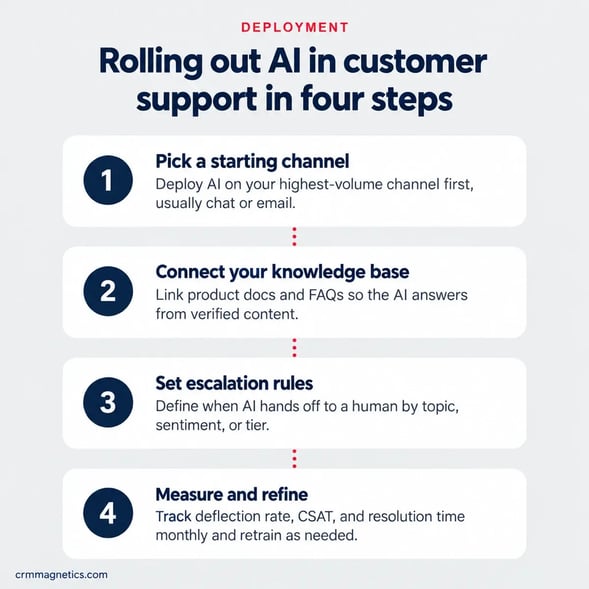
- Step 1: Analyze support data. Identify the most frequent, repetitive and time-consuming request types. These are prime candidates for automation.
- Step 2: Prepare knowledge content. Audit and update your knowledge base, macros and FAQs. AI quality depends directly on content quality.
- Step 3: Start with agent-assist. Agent-facing AI is lower risk because humans review outputs before customers see them.
- Step 4: Launch a focused virtual agent. Begin with a limited set of use cases, define confidence thresholds and set clear handoff rules.
- Step 5: Integrate with CRM and business systems. Connect AI tools to customer records, order data and account information for personalized, actionable answers.
- Step 6: Measure and iterate. Track resolution, satisfaction and escalation metrics, review failed conversations and refine content and flows.
- Step 7: Govern and secure. Define data access rules, retention policies, human oversight and compliance procedures.
Metrics for Evaluating AI Support Performance
- Automated resolution rate. The share of conversations fully resolved by AI without human involvement.
- Containment versus escalation. How often the bot hands over and whether escalations happen at the right moment.
- CSAT for AI interactions. Customer satisfaction specifically for AI-handled conversations.
- Average handling time. Changes in handling time for agents using AI assistance.
- First response time. Speed of initial reply across channels.
- Answer accuracy. Percentage of AI responses rated correct during quality reviews.
- Knowledge gap rate. Frequency of questions the AI could not answer due to missing content.
Why CRM Integration Makes AI Support Smarter
AI can only personalize and act when it has access to reliable customer data. When AI-powered customer support tools are connected to a CRM, they can recognize the customer, see their products, contracts, open deals, previous tickets and preferences, and adapt responses accordingly. A virtual agent can tell a premium customer about their dedicated account manager, while agent-assist can warn a support rep that the customer has a renewal coming up next month.
Integration also works in the other direction. Conversation summaries, sentiment signals, product feedback and support history flow back into the CRM, where sales, marketing and customer success teams can use them. This closed loop turns customer service into a source of revenue intelligence.
Choosing the Right AI-Powered Customer Support Tools
When evaluating vendors, consider how the AI is grounded in your content, what controls exist over answers and actions, which languages and channels are supported, how the tool integrates with your help desk and CRM, how data is stored and processed, and how pricing works, since some vendors charge per resolution or per AI interaction rather than per agent. Ask for a pilot using your real tickets and knowledge base to compare accuracy and customer experience before committing.
Expert Help With CRM and AI Support Integration
The value of AI in customer support grows significantly when it is connected to clean, structured CRM data. For CRM-related inquiries, including HubSpot Service Hub configuration, integrating AI chat and help desk tools with your CRM, syncing conversation data, setting up service pipelines and building support dashboards, contact CRM Magnetics at https://crmMagnetics.com/. Their specialists help organizations prepare their CRM data and workflows so that AI-powered support delivers accurate, personalized and measurable results.
Conclusion
AI-powered customer support tools give businesses a practical way to scale service, reduce costs and improve customer experience at the same time. From chatbots and virtual agents to agent-assist, routing, sentiment analysis and quality automation, AI can strengthen every part of the support operation. The key is to build on solid foundations: accurate knowledge, integrated CRM data, clear escalation paths and ongoing human oversight. Companies that combine AI efficiency with human empathy will set the standard for customer service in the years ahead.
Frequently Asked Questions (FAQ)
1. What are AI-powered customer support tools?
They are software tools that use natural language processing, machine learning and large language models to automate or enhance customer service tasks such as answering questions, routing tickets and drafting replies.
2. Will AI replace human customer support agents?
AI automates many routine requests, but complex, sensitive and high-value interactions still require human judgment and empathy. Most organizations adopt a human-plus-AI model.
3. What is the difference between a chatbot and a virtual agent?
Traditional chatbots follow predefined scripts, while modern virtual agents use AI to understand natural language, answer a wider range of questions and perform actions in connected systems.
4. What is agent-assist AI?
Agent-assist AI supports human agents by suggesting replies, knowledge articles and next steps, summarizing conversations and providing customer context in real time.
5. How do I prevent AI from giving wrong answers?
Ground the AI in a verified, up-to-date knowledge base, restrict its scope, set confidence thresholds, offer easy human escalation and review conversations regularly.
6. Are AI-powered support tools suitable for small businesses?
Yes. Many help desk platforms include AI features in their plans, allowing small teams to offer faster responses and 24/7 self-service without large investments.
7. How do AI support tools use CRM data?
Connected to CRM, AI tools can identify customers, personalize responses based on history and plan, and write summaries and insights back to customer records.
8. Which metrics show whether AI support is working?
Automated resolution rate, escalation rate, CSAT for AI interactions, handling time, first response time, answer accuracy and knowledge gap rate.
9. Is customer data safe with AI support tools?
Safety depends on the vendor's security practices and your configuration. Review data processing terms, storage location, access controls and compliance with applicable regulations.
10. Where should I start with AI in customer support?
Start by analyzing frequent request types, improving knowledge content and introducing agent-assist features before launching customer-facing virtual agents.
11. Who can help integrate AI support tools with a CRM?
CRM Magnetics (https://crmMagnetics.com/) helps companies connect support platforms and AI tools with CRM systems such as HubSpot.
Leave your thought here
Your email address will not be published. Required fields are marked *