


- April 25 2026
- Nikias Kray
Decoding the Business Software Alphabet
In today's fast-paced, digitally-driven business landscape, relying on manual processes and disjointed spreadsheets is a surefire way to fall behind the competition. As companies grow, they inevitably face the challenge of managing an ever-expanding volume of data, complex operational workflows, and the crucial task of keeping customers satisfied. This is where enterprise software solutions come into play, specifically Enterprise Resource Planning (ERP) and Customer Relationship Management (CRM) systems. When organizations begin their digital transformation journey, one of the most common debates that arises is ERP vs CRM. While both are critical applications that offer profound benefits to an organization's bottom line, they serve entirely different purposes, target different departments, and solve different sets of business problems.
Understanding the nuances of the ERP vs CRM landscape is essential for business leaders, IT decision-makers, and operations managers who want to make informed investments. This comprehensive guide will break down exactly what each platform does, highlight their core differences, explore how they complement one another, and help you determine which system—or whether a combination of both—is right for your organization's unique needs.
What is CRM (Customer Relationship Management)?
At its core, a CRM system is designed to manage your company's interactions with current and potential customers. It acts as a centralized database for all customer-facing information, ensuring that every touchpoint—from the first marketing email to post-sale customer support—is tracked, analyzed, and optimized.
Core Functionalities of a CRM
1. Sales Force Automation: CRMs streamline the sales process by tracking leads, managing sales pipelines, and forecasting revenue. Sales representatives can easily see where a prospect is in the buying journey, set reminders for follow-ups, and automate repetitive tasks like data entry.
2. Marketing Automation: Marketing teams use CRM platforms to segment their audience, execute targeted email campaigns, track engagement metrics (like open rates and click-through rates), and calculate the return on investment (ROI) of their marketing initiatives.
3. Customer Service and Support: A robust CRM equips support agents with a complete history of a customer's interactions, past purchases, and previous complaints. This enables faster ticket resolution, highly personalized support, and ultimately, higher customer retention rates.
By breaking down silos between sales, marketing, and customer service, a CRM ensures that the customer remains at the heart of the business strategy. The ultimate goal of a CRM is to drive revenue growth by improving customer acquisition, enhancing the overall customer experience, and maximizing customer lifetime value.

What is ERP (Enterprise Resource Planning)?
While CRM focuses on the 'front office' (customer-facing operations), ERP is the engine that runs the 'back office.' ERP software is a comprehensive suite of integrated applications designed to manage and automate a company's core business processes. It ties together disparate departments, ensuring seamless data flow and providing a single source of truth for the entire organization.
Core Functionalities of an ERP
1. Financial Management: The heart of any ERP system is its financial module. It handles accounting, accounts payable and receivable, general ledger, financial reporting, and risk management. It gives executives real-time visibility into the financial health of the company.
2. Supply Chain and Inventory Management: For product-based businesses, ERP tracks inventory levels in real-time, manages procurement, monitors warehouse operations, and optimizes logistics to prevent stockouts and reduce carrying costs.
3. Human Resources (HR): ERP systems often include Human Capital Management (HCM) modules that handle payroll, benefits administration, employee onboarding, time tracking, and performance evaluations.
4. Manufacturing and Production: ERP manages production schedules, material requirements planning (MRP), quality control, and shop floor operations, ensuring that products are manufactured efficiently and on time.
The primary objective of an ERP system is to improve operational efficiency, streamline complex processes, and reduce overarching business costs. By giving decision-makers a holistic view of the company's resources, ERP allows for better resource allocation, tighter cost controls, and massive productivity gains.
The Core Differences: ERP vs CRM
To truly grasp the ERP vs CRM debate, you must look at their fundamental objectives. CRM is about driving revenue; ERP is about reducing costs and improving efficiency. Let's delve deeper into the fundamental differences:
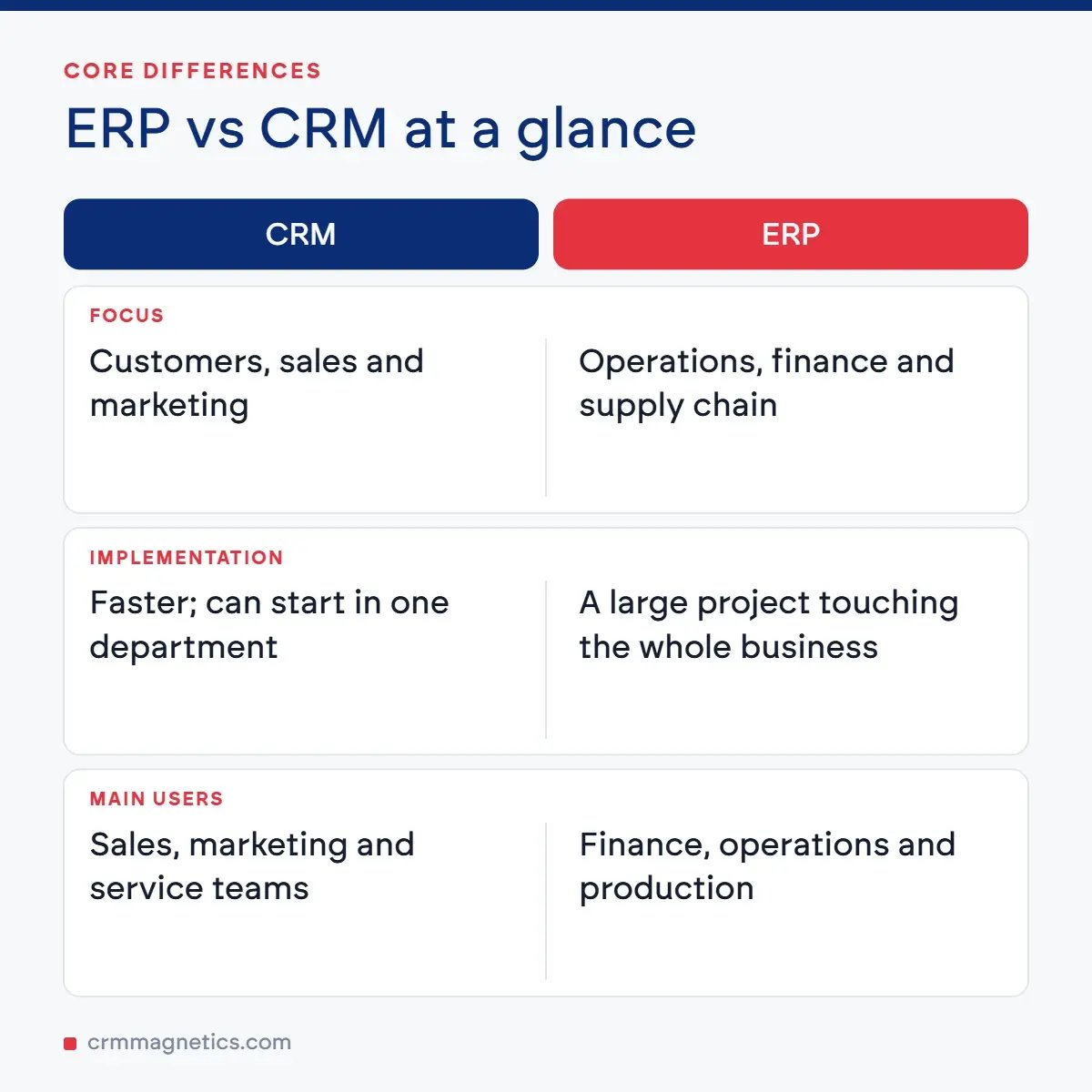
Focus and Philosophy: Think of CRM as focusing outward. It looks at the market, the prospects, and the customers. It aims to capture market share and build relationships. ERP, on the other hand, focuses inward. It looks at internal processes, employee productivity, machine efficiency, and cash flow.
Primary Users: CRM is exclusively the domain of customer-facing teams: Sales representatives, marketing managers, and customer support agents. ERP is heavily utilized by back-office teams: Financial controllers, supply chain managers, human resources personnel, and production supervisors.
Implementation Scope: Implementing a CRM is generally faster and less complex than an ERP implementation. A CRM can often be adopted by a single department (like sales) before being rolled out company-wide. An ERP implementation is a massive undertaking that touches almost every aspect of the business. It requires careful change management, extensive data migration, and thorough process reengineering.
Quick Comparison Table: ERP vs CRM
|
Feature |
CRM (Customer Relationship Mgmt) |
ERP (Enterprise Resource Planning) |
Key Difference |
|
Primary Focus |
Front-office (Sales, Setup, Support) |
Back-office (Finance, HR, Supply Chain) |
Outward vs Inward |
|
Main Goal |
Increase sales / maximize revenue |
Reduce costs / maximize efficiency |
Revenue vs Savings |
|
Key Users |
Sales, Marketing, Support staff |
Accountants, HR, Warehouse managers |
Customer-facing vs Internal operations |
|
Implementation Time |
Generally shorter (Weeks to Months) |
Generally longer (Months to Years) |
Complexity scale is vastly different |
|
Data Handled |
Customer interactions, sales pipelines, tickets |
Financials, inventory levels, payroll, schedules |
External relationships vs Internal resources |
The Power of Integration: Why Choose When You Can Combine?
While the concept of ERP vs CRM implies a choice between the two, modern businesses recognize that they are not mutually exclusive. In fact, integrating your ERP and CRM systems unlocks a level of synergy that neither platform can achieve on its own. When these two software giants talk to each other, data flows seamlessly throughout the entire organization, completely eliminating data silos.
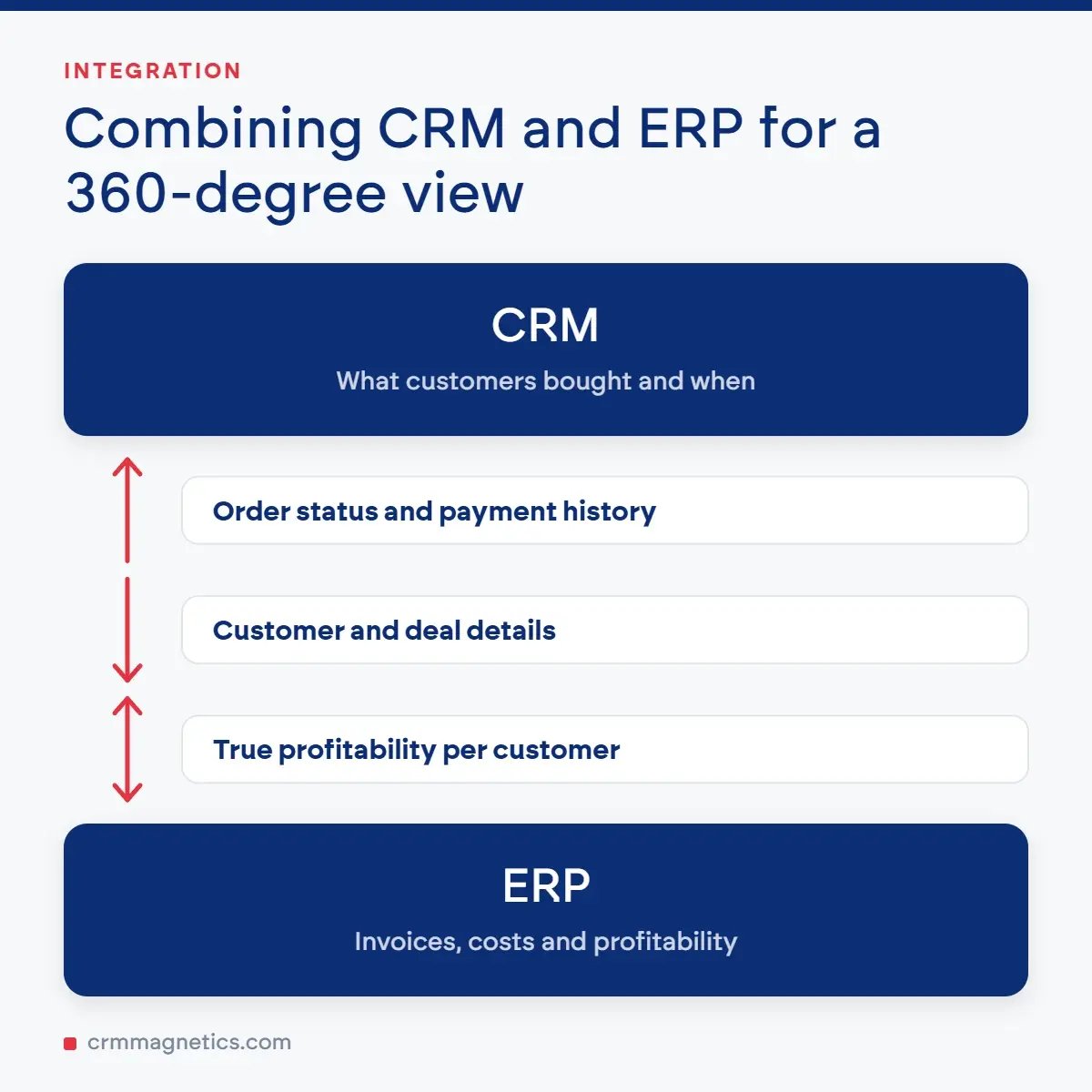
Consider this scenario: A sales rep closes a massive deal in the CRM. Without integration, that order must be manually re-entered into the ERP system for billing, inventory deduction, and fulfillment. This manual step is time-consuming and prone to human error. But with an integrated system, the closed-won deal in the CRM automatically triggers an order in the ERP. The finance team is alerted to generate an invoice, the warehouse is notified to pick and pack the items, and inventory levels are instantly updated to reflect the sale. Furthermore, the sales rep can view the fulfillment status and payment history of the customer directly from their CRM interface, allowing them to provide proactive and accurate updates to the client.
Integration provides a 360-degree view of your customer. You not only know what they bought and when (CRM data), but you also know if they pay their invoices on time, how much it cost to produce their goods, and what their true profitability is to your company (ERP data).
Conclusion: Charting Your Software Strategy
The ERP vs CRM decision isn't really a competition; it's a strategic roadmap. If your business is struggling to generate leads, organize its sales funnel, or keep customers happy, a CRM is your immediate priority. If, however, your sales are booming but your profits are shrinking due to operational bottlenecks, inventory chaos, and poor financial visibility, an ERP is the lifeline your business needs.
Ultimately, as your organization scales, the question transforms from 'ERP vs CRM' to 'How fast can we implement and integrate both?' By leveraging the revenue-generating power of CRM alongside the efficiency-driving force of ERP, businesses can build an unshakeable digital foundation tailored for sustainable, long-term success.
Frequently Asked Questions (FAQ)
Q1: Can an ERP replace a CRM?
A: Generally, no. While many modern ERP systems offer basic CRM functionalities (like basic contact management or quoting), they usually lack the advanced marketing automation, proactive customer service ticketing, and highly focused sales pipeline management found in a dedicated, best-of-breed CRM platform. To get the best of front-office engagement, a dedicated CRM is highly recommended.
Q2: Which one should a small business buy first?
A: Small businesses usually invest in a CRM first. In the early stages of a company, the top priority is acquiring and retaining customers to build a steady revenue stream. Once the business grows to a point where financial tracking, inventory management, and HR processes become too complex for spreadsheets and basic accounting tools, they will then look to implement an ERP system.
Q3: Is ERP more expensive than CRM?
A: Yes, in almost all scenarios. ERP systems manage a much broader spectrum of a company's operations, require significantly more customization, demand deep data migration spanning multiple departments, and take much longer to implement. Consequently, the software licenses and implementation costs for an ERP are substantially higher than those for a CRM system.
Q4: What happens if ERP and CRM data are kept separate?
A: Keeping ERP and CRM disconnected creates 'data silos.' This means your sales team might promise a product to a customer that the warehouse doesn't actually have in stock, or customer support might be unaware of a pending invoice dispute. It leads to duplicate data entry, slower order fulfillment, poor forecasting, and ultimately, a fractured customer experience.
Leave your thought here
Your email address will not be published. Required fields are marked *