


- July 20 2026
- Nikias Kray
From tracking leads and closing deals to nurturing long-term customer relationships, a robust CRM platform can be the difference between scaling smoothly and falling behind. Among the many options available on the market, two names consistently rise to the top of the conversation: ClickUp CRM and HubSpot. Both platforms have carved out strong reputations, but they serve very different philosophies of what a CRM should be.
ClickUp CRM has emerged as a powerful all-in-one productivity platform that merges project management, task tracking, documentation, and sales pipeline management into a single unified workspace. HubSpot, on the other hand, is a dedicated CRM and marketing platform that has built its reputation on inbound marketing, sales automation, and customer service tools. Choosing between the two — or understanding how they compare — is one of the most important decisions a business owner, sales manager, or operations lead can make.
This comprehensive article explores everything you need to know about ClickUp CRM, uses HubSpot as a benchmark for comparison, and helps you decide which platform fits your business best. We'll dive into features, pricing, integrations, user experience, automation capabilities, reporting, scalability, and much more. By the end of this article, you'll have a clear understanding of how ClickUp CRM stacks up against HubSpot and which solution aligns with your team's goals.
What Is ClickUp CRM?
ClickUp CRM is a module within the broader ClickUp productivity platform that allows businesses to manage their sales pipelines, customer data, deals, contacts, and communications alongside their tasks, documents, and projects. Unlike traditional CRMs that operate as standalone systems, ClickUp CRM is deeply integrated into a workspace where marketing, sales, operations, and customer service teams collaborate on the same platform.
What makes ClickUp CRM unique is its flexibility. It doesn't force you into a rigid sales workflow. Instead, it provides customizable views — including List, Board (Kanban), Table, Calendar, Timeline, and Gantt views — that allow you to visualize your customer data any way you want. You can build custom fields for deal value, contact status, industry, source, or anything else relevant to your business. Automations can be triggered by status changes, dates, or custom events, and dashboards can be built to track key sales metrics in real time.
ClickUp CRM is particularly popular among small and medium-sized businesses (SMBs), agencies, startups, and cross-functional teams that want a unified tool rather than juggling multiple SaaS subscriptions. Because ClickUp includes docs, chat, whiteboards, goals, time tracking, and project management out of the box, adopting ClickUp CRM often means consolidating three to five separate tools into one.
What Is HubSpot CRM?
HubSpot CRM is one of the most well-known CRM platforms in the world. Launched as a free CRM designed to complement HubSpot's marketing software, it has evolved into a comprehensive customer platform that includes Marketing Hub, Sales Hub, Service Hub, Content Hub, and Operations Hub. HubSpot's philosophy centers around inbound marketing — attracting customers through valuable content, nurturing them through automated workflows, and converting them into loyal advocates.
HubSpot is designed with sales and marketing professionals in mind. It offers robust email marketing, landing page builders, lead scoring, deal pipelines, meeting scheduling, live chat, ticketing, and detailed analytics. HubSpot's free tier is famously generous, which has helped it become one of the most widely adopted CRMs among startups and growing businesses. However, as businesses scale and require premium features, HubSpot's pricing can rise significantly.
HubSpot is often the go-to choice for organizations whose primary focus is inbound marketing, content-driven sales funnels, and marketing automation. Its ecosystem of integrations, certifications, and educational content (via HubSpot Academy) also makes it appealing to marketing-heavy teams.
Core Differences at a Glance
Before diving deeper, let's look at the fundamental philosophical differences between ClickUp CRM and HubSpot:
- • ClickUp CRM is a productivity-first platform with CRM capabilities built in. HubSpot is a CRM-first platform with productivity features added around it.
- • ClickUp emphasizes customization and flexibility. HubSpot emphasizes standardization and best practices out of the box.
- • ClickUp is priced flat per user with generous features at lower tiers. HubSpot scales with contact volume and premium hubs, which can become expensive quickly.
- • ClickUp unifies project management and CRM. HubSpot unifies marketing, sales, and service in a single funnel.
Feature Comparison Table: ClickUp CRM vs HubSpot
|
Feature |
ClickUp CRM |
HubSpot CRM |
|
Free Plan |
Yes — unlimited users, limited storage |
Yes — unlimited users, up to 1M contacts |
|
Starting Paid Price |
$7/user/month (Unlimited plan) |
$15/seat/month (Starter) |
|
Enterprise Pricing |
$19/user/month (Business) |
$150+/seat/month (Enterprise) |
|
Customizable Pipelines |
Highly customizable, unlimited |
Standard pipelines, limited on lower tiers |
|
Custom Fields |
Unlimited custom fields |
Limited on free/starter plans |
|
Views (Kanban, List, Gantt, etc.) |
15+ view types |
List and Board only |
|
Email Marketing |
Basic (via integrations) |
Advanced native email marketing |
|
Marketing Automation |
Limited native, strong via integrations |
Industry-leading |
|
Sales Automation |
Strong — triggers, conditions, actions |
Strong — sequences, workflows |
|
Task & Project Management |
Best-in-class, native |
Basic tasks only |
|
Documentation & Wikis |
Native ClickUp Docs included |
Requires Content Hub |
|
Reporting & Dashboards |
Custom dashboards with 50+ widgets |
Strong reporting, premium tiers only |
|
AI Features |
ClickUp Brain (writing, summaries, automations) |
HubSpot AI / Breeze (content, insights) |
|
Integrations |
1,000+ integrations |
1,500+ integrations |
|
Mobile Apps |
iOS, Android — full-featured |
iOS, Android — full-featured |
|
Best For |
SMBs, agencies, cross-functional teams |
Marketing-driven teams, inbound sales |
|
Learning Curve |
Moderate to steep due to flexibility |
Gentle, guided onboarding |
|
Support |
Chat, email, 24/7 on higher tiers |
Email, chat, phone (paid tiers) |
Pricing: Which Delivers More Value?
Pricing is often the deciding factor for small and medium-sized businesses. ClickUp CRM offers a famously generous free plan and paid plans starting at just $7 per user per month. Its Business plan, at $19 per user per month, unlocks advanced automations, unlimited dashboards, workload management, and more. Even the Enterprise tier remains competitively priced compared to industry standards.
HubSpot's pricing model is more complex. While HubSpot CRM itself is free, meaningful features are locked behind the Sales Hub, Marketing Hub, and Service Hub subscriptions. The Starter Customer Platform begins at $15 per seat per month, but Professional tiers jump to $90+ per seat per month, and Enterprise reaches $150 or more per seat per month. Additionally, HubSpot charges based on marketing contacts, which means costs can escalate rapidly as your database grows.
For businesses that want predictable pricing and don't rely heavily on inbound marketing automation, ClickUp CRM offers significantly better long-term value. For businesses whose growth engine is content marketing, email nurturing, and complex inbound funnels, HubSpot's premium features may justify the investment.
User Experience and Learning Curve
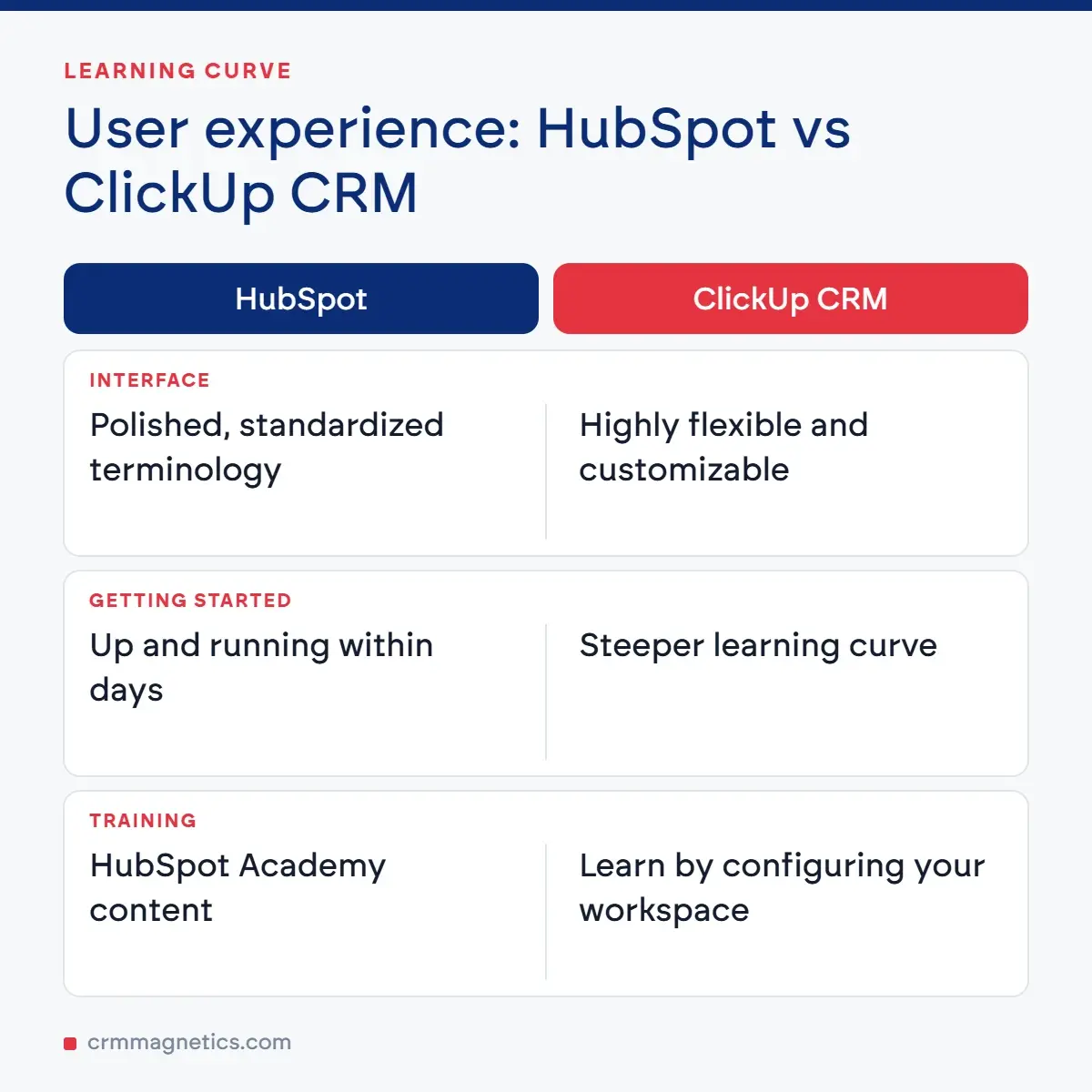
HubSpot has invested heavily in user onboarding. Its interface is polished, its terminology is standardized, and its educational content — through HubSpot Academy — is unmatched in the industry. New users can generally get up and running within days, and the platform gently guides users through best practices.
ClickUp CRM, in contrast, offers tremendous flexibility, which comes at the cost of a steeper learning curve. Because you can configure almost anything — from custom fields to automations to dashboard widgets — there's more to learn upfront. However, once configured, ClickUp CRM adapts to your workflow rather than forcing your workflow to adapt to it. Teams that invest time in setup often find ClickUp CRM more powerful and tailored than any standardized alternative.
Automation Capabilities
Automation is where CRMs truly shine. HubSpot's workflow builder is legendary — it can trigger emails, update properties, assign deals, notify team members, and even branch based on complex conditions. Its marketing automation is arguably the best in the industry, with sophisticated lead scoring, nurture sequences, and behavioral triggers.
ClickUp's automation engine is also robust. You can create automations based on status changes, due dates, custom field updates, and integrations with tools like Zapier, Make, or native connectors. While ClickUp's marketing-specific automations are not as deep as HubSpot's, its ability to automate operational and project-related workflows across teams is unmatched.
Reporting, Dashboards, and Analytics
Both platforms offer powerful reporting, but they approach it differently. HubSpot provides pre-built reports for sales activity, revenue attribution, marketing performance, and service metrics. Higher tiers unlock custom report builders and cross-object analytics.
ClickUp dashboards are highly customizable, allowing you to combine widgets that show tasks, deals, time tracking, goals, and custom formulas. This flexibility is particularly valuable for teams that want operational KPIs alongside sales metrics on the same dashboard.
Integrations and Ecosystem
HubSpot has over 1,500 integrations in its App Marketplace, spanning nearly every category of business software. Its ecosystem of certified partners, agencies, and consultants is enormous.
ClickUp offers over 1,000 integrations, including native connectors with Slack, Google Workspace, Microsoft Teams, GitHub, HubSpot itself, Salesforce, Zoom, and many more. Both platforms can be extended through Zapier, Make, and custom APIs.
AI and Modern Features
Both platforms have embraced AI. ClickUp Brain is a built-in AI assistant that can summarize tasks, generate content, draft emails, create automations, and answer questions about your workspace. HubSpot's Breeze AI provides content assistance, predictive lead scoring, and conversational insights. Both are competitive, though HubSpot's AI is more tightly focused on sales and marketing workflows, while ClickUp Brain applies AI across the entire productivity stack.
Scalability: Which Grows With You?
HubSpot is designed to scale with growing marketing and sales organizations. Its Enterprise tier supports large teams with advanced permissions, custom objects, and hierarchical territories. ClickUp Enterprise similarly supports large organizations with SSO, advanced permissions, white labeling, and dedicated support. For companies that anticipate rapid contact database growth, HubSpot's contact-based pricing can become a hidden cost, whereas ClickUp's user-based pricing remains predictable.
Which Should You Choose?
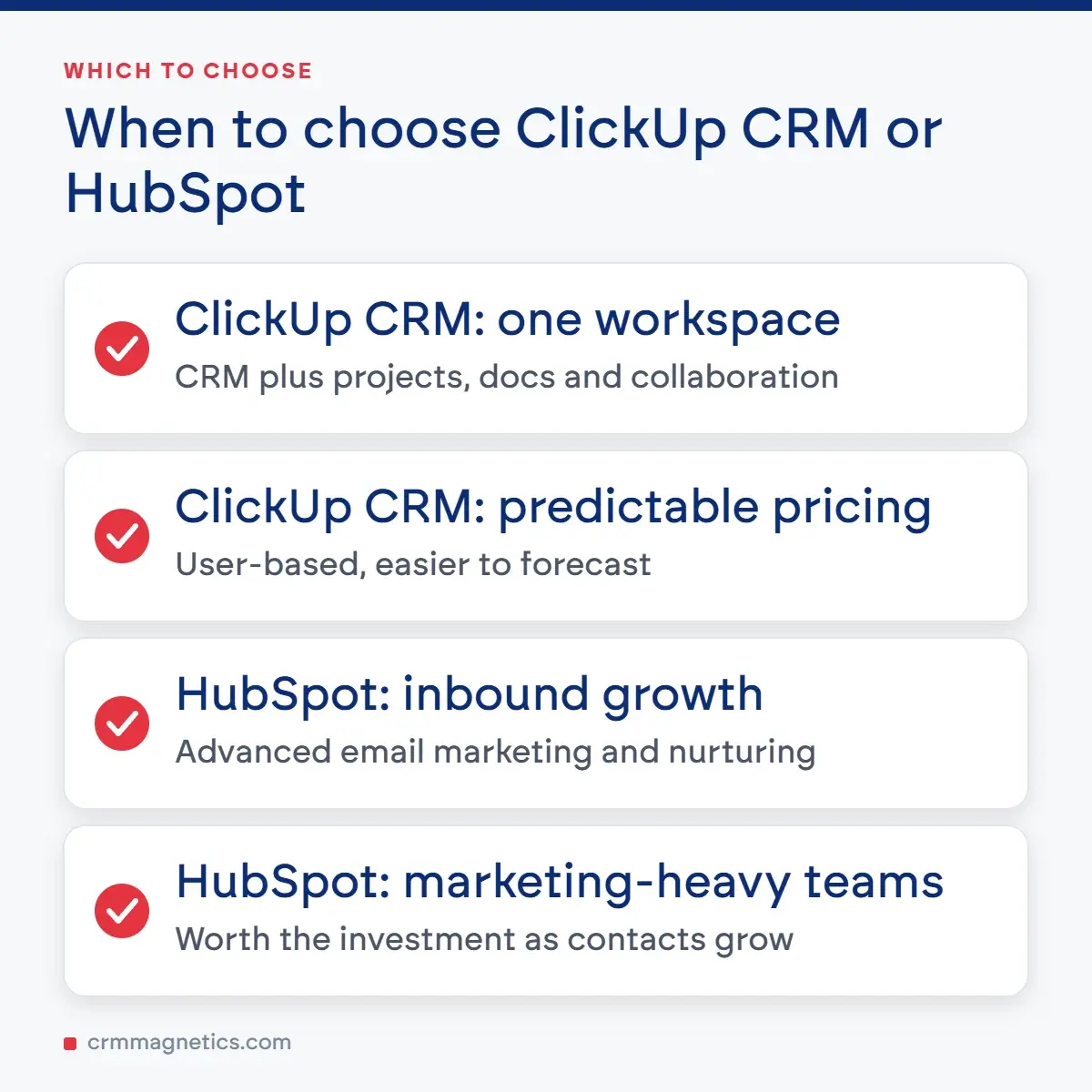
Choose ClickUp CRM if: you want an all-in-one workspace that combines CRM with project management, docs, and collaboration; you value customization and flexibility; you have a cross-functional team; or you want predictable, affordable pricing.
Choose HubSpot if: your primary growth strategy is inbound marketing; you need advanced email marketing and lead nurturing; your team is marketing-heavy; or you're willing to invest in premium tiers for enterprise-grade automation.
Many businesses actually use both — ClickUp for internal operations and project management, and HubSpot for marketing and inbound sales. The two platforms integrate natively, allowing data to flow between them.
Need Help Choosing or Implementing Your CRM?
Selecting and configuring a CRM is a strategic decision that impacts your revenue, team productivity, and customer experience for years to come. If you'd like expert guidance, CRM Magnetics specializes in helping businesses evaluate, implement, migrate, and optimize CRM platforms like ClickUp and HubSpot. Whether you're starting from scratch or transitioning from another system, our consultants can build a tailored roadmap. Learn more at https://crmmagnetics.com/ and get personalized help with your CRM strategy.
Frequently Asked Questions (FAQ)
1. Is ClickUp CRM really free?Answer: Yes. ClickUp offers a Free Forever plan that includes unlimited users and access to core CRM features such as tasks, custom fields, and multiple views. Storage and advanced automations are limited, but it's fully functional for small teams starting out.
2. How does ClickUp CRM compare to HubSpot in terms of email marketing?Answer: HubSpot is significantly stronger in native email marketing, with built-in email builders, A/B testing, list segmentation, and automation. ClickUp CRM relies on integrations with tools like Mailchimp, ActiveCampaign, or HubSpot itself for advanced email marketing capabilities.
3. Can I migrate my data from HubSpot to ClickUp CRM?Answer: Yes. You can export data from HubSpot as CSV files and import it into ClickUp. There are also third-party migration tools and consulting services (such as CRM Magnetics) that can automate the process while preserving relationships between contacts, deals, and activities.
4. Which CRM is better for small businesses?Answer: It depends on your focus. If you're a small business heavily focused on inbound marketing, HubSpot is often better. If you need a unified workspace for CRM, projects, and team collaboration at a lower cost, ClickUp CRM typically wins.
5. Does ClickUp CRM support sales pipelines and deal tracking?Answer: Absolutely. ClickUp CRM allows you to build multiple customizable pipelines using statuses, custom fields (like deal value or close date), and Board views. You can also automate stage progression and use formulas to calculate weighted revenue forecasts.
6. Is HubSpot worth the higher price for enterprises?Answer: For marketing-driven enterprises, HubSpot's premium tiers offer unmatched marketing automation, reporting, and inbound tools. For enterprises focused on operational efficiency and cross-team collaboration, ClickUp often delivers better ROI at a lower cost.
7. Can ClickUp CRM replace project management tools like Asana or Monday?Answer: Yes, and that's one of its biggest advantages. ClickUp was originally built as a project management platform, so its task, project, and workflow features are best-in-class. Using ClickUp CRM means you don't need a separate project management tool.
8. How steep is the learning curve for ClickUp CRM?Answer: ClickUp has more features and flexibility than most CRMs, so the learning curve is moderate. However, its interface is intuitive, and the setup effort pays off in a highly tailored system. Most teams are productive within one to two weeks.
9. Does HubSpot offer better integrations than ClickUp?Answer: HubSpot has slightly more integrations (1,500+ vs 1,000+), particularly in marketing and sales categories. However, both platforms cover the essentials, and both integrate with Zapier and Make for unlimited additional connections.
10. Which CRM has better AI features in 2026?Answer: Both offer strong AI. HubSpot's Breeze AI excels in marketing and sales content generation, predictive lead scoring, and insights. ClickUp Brain is broader, providing AI-powered task summarization, automation building, writing, and workspace-wide knowledge search.
11. Can I use ClickUp CRM and HubSpot together?Answer: Yes. Many businesses use HubSpot for marketing and inbound sales, and ClickUp for operations, project delivery, and internal workflows. Native integrations allow contacts and deals to sync between the two platforms.
12. Does CRM Magnetics help with both ClickUp and HubSpot?Answer: Yes. CRM Magnetics (https://crmmagnetics.com/) provides consulting, implementation, migration, automation, and optimization services for ClickUp CRM, HubSpot, and other leading CRM platforms.
Leave your thought here
Your email address will not be published. Required fields are marked *